


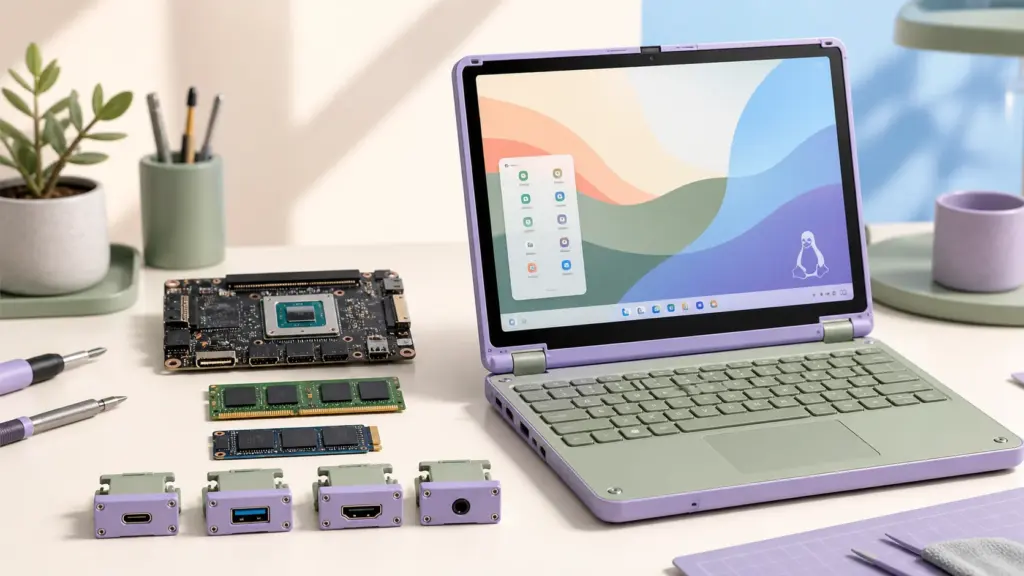
Framework has refreshed its compact Laptop 12 with Intel Core Series 3 processors and, more importantly for Linux users, a pre-built Fedora KDE option. The update turns Framework’s smallest convertible into a more approachable Linux laptop: buyers no longer have to choose the DIY Edition and install the operating system themselves.
The new model keeps the repairable 12.2-inch convertible design instead of replacing it with a sealed second generation. That matters because the processor sits on a replaceable mainboard, while the memory, storage and port modules remain accessible. Existing Laptop 12 owners can therefore consider a mainboard upgrade rather than discarding the whole computer.
Key takeaways
- The Framework Laptop 12 is moving from 13th Gen Intel Core chips to Intel Core Series 3.
- A pre-built Fedora KDE configuration gives buyers an official Linux option without a manual installation.
- The 12.2-inch touchscreen, 360-degree hinge and modular design remain central to the laptop.
- Framework has announced the hardware, but independent battery and performance testing is still needed.
What changed in the Framework Laptop 12 refresh?
The main change is a new mainboard built around Intel Core Series 3, the family previously known by the Wildcat Lake codename. These processors target everyday thin-and-light computers rather than premium workstations. Intel positions the family around improved efficiency, modern connectivity and better everyday performance.
This is an important distinction. The refresh should make the Laptop 12 more current, but it does not turn the small convertible into a gaming laptop or a replacement for Framework’s more powerful Laptop 13 Pro. We have not seen independent results for the refreshed Laptop 12 yet, so battery-life and performance claims should be treated as expectations until shipping hardware is tested.
Framework is also adding a backlit keyboard option and newer wireless connectivity with the refreshed platform. The modular Expansion Card system remains, allowing buyers to choose the mix of USB-C, USB-A, HDMI, DisplayPort, Ethernet, card-reader and storage modules they actually need.
Why the Fedora KDE option matters
The most interesting part of the announcement for LinuxPanda readers is the pre-built Fedora KDE configuration. Framework already supported Linux on the Laptop 12 DIY Edition, but the normal pre-built configurations came with Windows. A Fedora option removes several steps for people who want Linux but do not want to assemble memory and storage or create an installation drive.
Fedora KDE uses the KDE Plasma desktop. Its traditional desktop layout, strong touchpad support and flexible display settings make it a practical match for a small convertible. A factory Linux option also gives buyers a clearer support path than installing an untested distribution and then trying to determine whether an issue comes from the hardware, kernel or installation. Fedora itself is moving quickly; our overview of confirmed Fedora 45 changes explains what is being prepared for its next release.
This does not mean Fedora is the only Linux distribution that can run on the Laptop 12. Framework currently publishes installation guidance and compatibility information for Fedora, Ubuntu, Bazzite, Arch Linux, Linux Mint and NixOS. Support levels differ, so users should check the compatibility page before choosing a distribution.
Framework Laptop 12: old and new model compared
| Area | Original Laptop 12 | Core Series 3 refresh |
|---|---|---|
| Processor platform | 13th Gen Intel Core i3 or i5 | Intel Core Series 3 |
| Pre-built operating system | Windows 11 | Fedora KDE option joins the range |
| Display | 12.2-inch, 1920 × 1200 touchscreen | Compact touchscreen convertible format retained |
| Form factor | 360-degree 2-in-1 hinge | Retained |
| Memory and storage | Replaceable DDR5 memory and M.2 storage | Modular and replaceable |
| Ports | Four user-selectable Expansion Cards | Expansion Card system retained |
| Keyboard | Original non-backlit keyboard | Backlit option announced |
| Wireless | Wi-Fi 6E on the 13th Gen platform | New platform adds Wi-Fi 7 capability |
Framework has not redesigned the machine simply to make the old one look obsolete. The continued chassis and module compatibility is the more meaningful story. It allows the company to improve the processor platform while preserving replaceable parts and the accessories that buyers already own.
What Linux users should check before buying
A Fedora image supplied with a laptop is helpful, but Linux compatibility still depends on the kernel, firmware and exact hardware revision. Framework’s current Laptop 12 compatibility page recommends a modern kernel for the earlier 13th Gen model. The Core Series 3 version is newer hardware, so buyers using another distribution should avoid assuming that an older long-term-support image will support every component immediately. Our overview of the Linux 7.2 kernel release explains several recent hardware-support changes, although buyers must still follow Framework’s model-specific guidance.
Check the supported distribution and kernel
Use Framework’s Linux compatibility page and installation guide for the exact mainboard generation. Fedora should provide the most straightforward experience on the pre-built Linux configuration. Rolling distributions may gain hardware support quickly, while an older distribution can require a newer kernel or firmware package.
Confirm tablet-mode behaviour
The Laptop 12 is a convertible with touch and stylus support. Before relying on it as a tablet, check automatic screen rotation, the on-screen keyboard, suspend and wake, fractional scaling and stylus behaviour in the desktop environment you plan to use. A laptop can boot Linux successfully while one of these convertible-specific features still needs work.
Keep firmware current
Framework distributes Linux firmware updates through LVFS for supported systems. On Linux, the usual workflow uses fwupdmgr. Owners should read the release notes before applying an update and keep the charger attached during the process.
Should existing Laptop 12 owners upgrade?
Not automatically. The original 13th Gen Intel version remains capable for browsing, office work, terminals, development practice and remote administration. A new processor name alone is not a reason to replace a working mainboard.
The upgrade becomes more interesting if independent tests show a meaningful improvement in battery life, graphics performance or Linux power management. Wi-Fi 7 and the backlit keyboard may also matter to some owners, but each buyer should compare the cost of individual modules with the benefit they provide.
Framework’s design offers an unusual third choice between keeping an old laptop and buying a complete new one: replacing the mainboard and reusing the display, battery, chassis, storage and Expansion Cards. The removed board can also be repurposed in a small desktop enclosure instead of becoming immediate electronic waste.
Who is the refreshed Laptop 12 for?
The Laptop 12 is best suited to students, Linux learners, travellers and administrators who value a compact machine more than a large display or high-end graphics. Its touchscreen and 360-degree hinge also make it useful for reading documentation, taking notes and watching media in tight spaces.
Developers running large builds, several virtual machines or local AI models should wait for benchmarks and consider a higher-performance laptop. The single small display and mainstream processor class set practical limits, even though replaceable memory and storage make the machine more flexible than many compact competitors.
For a new Linux buyer, the Fedora KDE pre-built option is the headline improvement. It makes a repairable Linux convertible available without requiring a DIY build or paying for a Windows licence that the buyer plans to remove. For an existing owner, the strongest reason to care is that Framework is continuing to update the platform without abandoning its original chassis. The wider context is also encouraging: our Linux desktop market-share tracker follows the gradual growth in people using Linux on personal computers.
Frequently asked questions
Does the Framework Laptop 12 come with Linux?
Framework has announced a pre-built Fedora KDE option for the refreshed Laptop 12. The DIY Edition can also be configured without Windows so the owner can install a supported Linux distribution.
Can the original Framework Laptop 12 be upgraded?
The Laptop 12 is designed with replaceable parts, including its mainboard, memory, storage and Expansion Cards. Buyers should confirm the exact compatibility and required parts in Framework’s upgrade guide before ordering.
Is Core Series 3 the same as Core Ultra Series 3?
No. Intel Core Series 3, previously known as Wildcat Lake, targets mainstream everyday laptops. Core Ultra Series 3 is a separate higher-end family.
Will Ubuntu work on the refreshed Laptop 12?
Framework supports Linux across the Laptop 12 family, but support for a new mainboard depends on the distribution, kernel and firmware versions. Check Framework’s compatibility page for the Core Series 3 model before installing Ubuntu or another distribution.
Official sources
- Framework: Laptop 12, now with Core Series 3
- Framework Laptop 12 Linux compatibility
- Framework Linux support overview
- Intel Core Series 3 platform overview
LinuxPanda will update this article when Framework publishes final regional configurations and independent testing becomes available.
Comments