


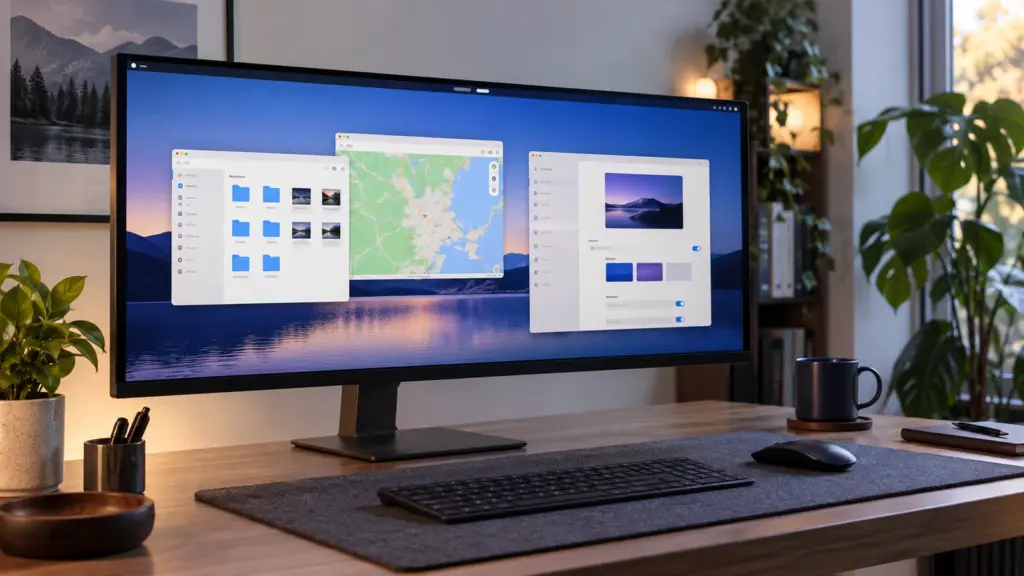
GNOME 51 is now available with smoother desktop performance, offline maps, a faster Files app, safer software-install warnings and a long list of accessibility improvements. The release, published on 16 September 2026, is named “A Coruña” and follows six months of development.
The practical answer for most users is simple: GNOME 51 is a meaningful desktop upgrade, but it is not something to install manually over an existing distribution. It will arrive through upcoming Linux distribution releases and updates. GNOME says major distributions will begin shipping it in the coming weeks.
- GNOME 51 improves animation scheduling, screen recording and application responsiveness.
- Maps can download regions for offline use and show richer public-transport information.
- Files, Software, Calendar and the document tools receive substantial usability upgrades.
- Legacy NVIDIA driver interfaces and WEP wireless support have been removed.
- Users should wait for their Linux distribution to deliver the release.
What changed in GNOME 51?
GNOME 51 focuses less on one dramatic redesign and more on making the whole desktop faster, clearer and more useful. The official GNOME 51 release notes cover improvements across Mutter, Settings, Remote Desktop, Maps, Files, Web, Software, Calendar, Loupe, the Sushi file previewer and Papers.
| Area | Important change | Who benefits |
|---|---|---|
| Desktop | Reworked frame scheduling and faster capture | Everyone, especially under heavy load |
| Maps | Offline regions and live transit information | Travelers and commuters |
| Files | Faster folders, smarter selection and grouped notices | Users managing large directories |
| Software | End-of-life warnings and clearer Flatpak permissions | Security-conscious users |
| Accessibility | Broader reduced-motion support and keyboard screenshots | Keyboard and assistive-technology users |
The update is also closely connected with the next generation of Linux distributions. Fedora 45 is expected to be one of the prominent early adopters, making this release relevant to readers following our Fedora 45 development tracker.
How does GNOME 51 improve performance and displays?
Mutter’s frame scheduling and screen delivery have been reworked. GNOME says this should produce smoother animations even when the system is busy. Screen recording also avoids unnecessary copying and repeated work, which should reduce overhead during captures.
The Settings app now remembers external-monitor brightness across reboots and HDR changes. Convertible devices gain automatic screen rotation plus an orientation lock, while the display-arrangement interface uses improved center-aligned snapping.
One compatibility change deserves attention: GNOME removed support for legacy NVIDIA driver interfaces and now relies on modern standard graphics interfaces. That does not mean supported NVIDIA hardware is removed. It means users depending on old proprietary driver stacks should confirm that their distribution provides a current driver before upgrading.
What changed in Settings, networking and security?
Laptop users can ask GNOME to disable the touchpad automatically when a mouse is connected. Network settings add DNS search-domain controls, and the obsolete WEP wireless-security option is gone. Remote Login can now work with SSH socket servers as well as conventional service-based setups.
Fingerprint enrollment has a redesigned interface. Remote Desktop adds smartcard forwarding and Kerberos authentication for organizations that use centralized identity systems. These are specialized features, but they make GNOME more practical in managed workplaces.
The removal of WEP is sensible because it is not a safe modern Wi-Fi standard. It does not affect WPA2 or WPA3 networks.
Which GNOME 51 applications received the biggest upgrades?
Maps works offline
GNOME Maps can download a selected region and use it without a network connection. Public-transport routes may show live arrivals, delays, platforms and walking times when the local data provider supports them. This is one of the clearest user-facing additions in the release.
Files feels more responsive
Files no longer blocks the interface during several slower operations, and reloading large or slow folders is faster. It shows how many items are being dragged, selects newly copied files automatically and groups related notifications. Read-only and inaccessible folder emblems are also clearer.
Software warns about abandoned applications
GNOME Software can warn before installing an application that is no longer maintained. Expanded Flatpak permission information helps users understand which files an application may access, while cached app data and optimized icon loading improve startup speed.
Calendar, documents and previews improve
Calendar has been reworked for smoother month views and more efficient synchronization. The Sushi file previewer moves to GTK 4 and libadwaita, supports dark mode and uses modern image and document rendering libraries.
Papers can insert a visual handwritten signature into a document. This is convenient for ordinary forms, but GNOME correctly notes that an image of a signature is not a cryptographic digital signature and does not prove authenticity.
What accessibility improvements are included?
The Reduced Motion setting now affects more core widgets and shell animations. Screenshot selections can be resized and moved entirely with the keyboard, and a focus-ring timeout can be disabled when assistive technology needs more interaction time.
GNOME also improved screen-reader descriptions for the app dock, search results and application grid. SVG-based cursors remain sharp across different scaling settings, which is useful on mixed-resolution and high-density displays.
When will GNOME 51 reach Ubuntu, Fedora and other distributions?
GNOME is a desktop platform, not a complete Linux distribution. The project says version 51 will reach major distributions during the coming weeks. Users should check their distribution’s package policy rather than downloading random packages or replacing core desktop components by hand.
Fedora generally adopts new GNOME versions quickly. Rolling distributions may also deliver it early, while long-term-support distributions usually keep the desktop generation they shipped with. Ubuntu users following the development branch should also remember that the operating system is changing other core components, including the Ubuntu 26.10 Rust Coreutils transition.
| System type | Expected approach | Recommendation |
|---|---|---|
| Rolling release | Packages may arrive relatively soon | Read distribution notices before updating |
| Fedora development or next release | Likely early GNOME 51 availability | Use official repositories |
| Ubuntu interim development | Depends on distribution integration | Do not mix unsupported repositories |
| LTS or enterprise distribution | GNOME generation may remain unchanged | Prioritize supported packages over novelty |
Should you upgrade to GNOME 51 immediately?
Most people should wait until GNOME 51 is offered by their distribution. The improvements are worthwhile, but manually replacing a desktop stack can create dependency, extension and graphics-driver problems.
Before upgrading, check extension compatibility, current backups and graphics drivers. Users with older NVIDIA installations should pay particular attention to the modern-driver requirement. Anyone testing a development distribution should expect ordinary pre-release bugs.
Our assessment
GNOME 51 is a strong usability release. Offline Maps is the obvious headline, but the more important long-term work is spread across frame scheduling, responsive applications, accessibility and clearer software-safety information. That combination should make the desktop feel better without forcing users to relearn it.
GNOME remains central to the broader Linux desktop ecosystem, so version 51 is likely to shape the experience of several important distributions over the next release cycle.
Frequently asked questions
Is GNOME 51 available now?
The upstream release is available, but most users will receive it later through their Linux distribution.
Does GNOME 51 remove NVIDIA support?
No. It removes legacy NVIDIA driver interfaces and relies on modern graphics interfaces. Current supported drivers remain the correct path.
Can GNOME Maps work without internet access?
Yes. Version 51 can download selected map regions for offline use.
Should Ubuntu LTS users install GNOME 51 manually?
No. Replacing the supported desktop stack manually can create dependency and upgrade problems. Wait for supported distribution packages.

Comments